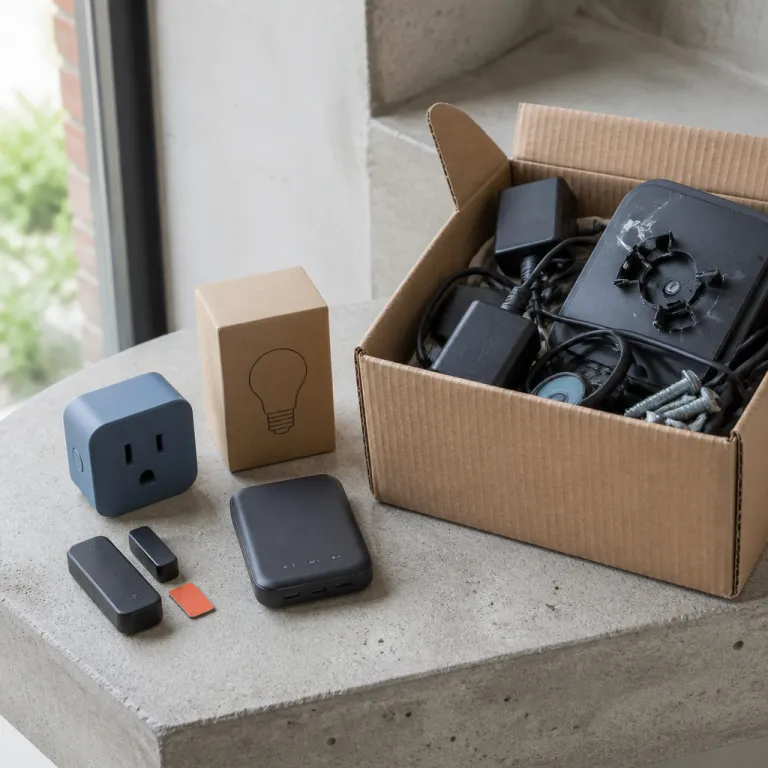
Why a smart home setup for a renter’s apartment must move with you
A smart home setup for a renter’s apartment lives under two hard rules. You cannot touch the wiring or the walls in ways your landlord would consider structural, and every smart device you buy should be able to leave with you when the lease ends without turning into e-waste. That means every euro you spend on smart home devices has to balance performance, portability, and the risk that a future apartment will not support the same layout.
Think of your smart home as layers rather than a fixed installation in one home. The portable layer includes smart plugs, smart lights, compact hubs, and mesh Wi-Fi nodes that sit on shelves, because these home devices unplug cleanly and follow you to the next door without a trace. The semi portable layer includes a video doorbell with an adhesive mount, a renter friendly smart lock where the landlord agrees, and a basic security system kit that uses removable sensors instead of drilled brackets.
For a young professional on a budget, the best smart purchases are the ones that survive at least two moves. A smart plug that works with both Google Assistant and Amazon Alexa, for example, will usually integrate with a future Google Home or Amazon Echo speaker without drama, while a proprietary hub that ignores Matter standards may die with your current router. When you compare MSRP prices, always ask whether the smart home device is locked to one ecosystem or whether it will still be useful when you upgrade from an Echo Dot to an Apple HomePod or from a basic Amazon speaker to a more advanced Google Assistant display.
Security should sit at the center of every smart home decision in a renter’s apartment. Each video doorbell, smart lock, or indoor camera adds a new home security surface that you must manage, and you remain responsible for factory resets and account cleanup when you move out. If you skip that cleanup, the next tenant could inherit access to your old devices, which quietly turns your smart home convenience into a lingering security risk.
Because many renters relocate every few years, the cost of stranded devices adds up quickly. A hardwired smart light switch that you leave behind after one lease effectively doubles its cost per year of use, while a portable smart light bulb that you unscrew and pack keeps delivering value in the next home. Treat every euro spent on smart home gear as a mini subscription to comfort and security, and cancel anything that cannot travel.
Deal hunters should borrow the same comparison mindset used for subscription gadgets or gaming rentals. When you evaluate a smart home setup for a renter’s apartment, think the way you would when reading about smart shopping strategies in weekly ads, and focus on total cost of ownership rather than the flashiest video feature. The best smart home devices for renters are rarely the most expensive ones, but they are almost always the most flexible and easiest to remove without a trace.
The portable layer: smart plugs, smart lights, hubs, and mesh Wi-Fi
The safest starting point for a smart home setup in a renter’s apartment is the fully portable layer. Smart plugs, smart lights, compact hubs, and mesh Wi-Fi nodes sit in wall sockets or on shelves, and they leave no scars when you move to a new home. This layer gives you most of the smart home comfort you see in glossy review videos without any of the lease anxiety that comes with drilling into a door frame.
A single smart plug can turn a basic lamp into a smart light, and a set of smart plugs can automate fans, coffee makers, or even a budget robot vacuum. When you choose smart plugs, look for models that support both Google Home and Amazon Echo ecosystems, because that flexibility lets you switch between an Echo Dot, an Apple HomePod, or a Google Assistant speaker without replacing hardware. Matter compatible smart plugs and smart lights are especially valuable for renters, since they reduce ecosystem lock in and keep your devices working even if you change phones or move from an Amazon account to a Google account.
Portable hubs and mesh Wi-Fi nodes also deserve a place in a renter friendly smart home. A small hub that speaks to your home devices over Wi-Fi or Thread can sit next to your router, and it will not bother your landlord because it uses the same plug as any other gadget. Mesh nodes that plug into wall sockets help your video doorbell, robot vacuum, or security system sensors stay connected in long apartments where the router sits far from the front door.
Lighting is where many renters see the fastest quality of life upgrade. Swapping a few bulbs for smart lights gives you app and voice control without touching any wiring, and you can pack those bulbs when you leave just as you would pack a lamp. If you pair these smart lights with a voice assistant such as Google Assistant or Amazon Alexa on a small Amazon Echo or Google Home speaker, you get hands free control that feels premium even when the MSRP of each bulb stays modest.
Brands like Kasa Smart and Tapo offer smart plug and smart light options that often undercut the MSRP of more famous names while still supporting major ecosystems. A Tapo integration with Google Home or Amazon Echo, for example, can give you reliable voice control over multiple smart plugs without a separate hub, which keeps your setup simple and renter friendly. When you read any review of portable smart home devices, focus on whether the plug, bulb, or hub can be reset easily and re linked in a new home, because that reset process is what keeps your gear from becoming e-waste after a move.
Portable devices also reduce the risk of insurance disputes. Since you are not altering the electrical system or drilling into walls, your renter’s policy is less likely to raise questions about damage caused by smart home experiments, and you can unplug everything quickly if you need to show the apartment in its original state. For deal conscious renters, this portable layer delivers the best smart balance between comfort, security, and long term value.
The semi portable layer: video doorbells, smart locks, and renter friendly security
Once the portable basics are in place, some renters want more serious home security and access control. The semi portable layer covers a video doorbell with an adhesive or bracket mount, a renter friendly smart lock where the landlord approves, and a compact security system with peel and stick sensors. These devices can usually move with you, but they require more planning because they touch the door, the frame, or the lease language.
Battery powered video doorbells that mount with adhesive or existing screw holes are the safest bet for a smart home setup in a renter’s apartment. A good video doorbell should integrate with Google Home, Amazon Echo, or Apple HomePod for voice announcements, and it should support streaming video to your phone without forcing a long contract. When you compare MSRP prices, weigh the cost of cloud video storage against the length of your lease, because paying for multi year storage on a doorbell you might remove in eighteen months rarely makes financial sense.
Smart locks sit in a more delicate category for renters. Some smart lock models replace only the interior thumb turn while leaving the exterior key cylinder intact, which means your landlord still has a physical key and the door’s appearance from the hallway does not change. If your lease allows this kind of modification, choose a smart lock that supports both Google Assistant and Amazon Alexa, and confirm that you can restore the original hardware without visible marks when you move out.
A basic security system for renters usually relies on wireless sensors and a small hub that connects to your router. Look for a home security kit that uses adhesive backed contact sensors on doors and windows, because these can be removed with careful heat and patience, leaving the door frames intact. When you read any review of renter focused security systems, pay attention to whether the manufacturer offers clear instructions for removing sensors and whether the alarm can function without a long monitoring contract.
Many renters also add a compact robot vacuum to this semi portable layer, since it quietly protects both time and deposit by keeping floors cleaner with less effort. A robot vacuum that integrates with your smart home through Google Home or Amazon Echo can start on a schedule or by voice, and it will not upset your landlord because it simply docks at a plug like any other appliance. If you are building a tiered setup, you can use frameworks similar to those in an affordable smart home devices guide to decide whether a robot vacuum belongs in your first wave of purchases or in a later upgrade.
Because semi portable devices touch the physical structure, they also intersect with insurance and liability. Some renter’s policies treat a self installed security system as personal property, while others may exclude damage caused by adhesives on doors or frames, so reading both the lease and the policy matters as much as reading the MSRP label. If a landlord objects to any smart lock, video doorbell, or sensor, step back and prioritize portable smart plugs and smart lights instead, because no deal is worth risking your housing stability.
The do not buy list for renters: what becomes e-waste when you move
Not every smart home device belongs in a renter’s apartment, no matter how attractive the discount looks. Hardwired smart switches, in wall thermostats, and doorbells that require drilling into masonry often become stranded assets the moment you sign a new lease. These devices are designed for owners who can modify wiring and leave installations in place for a decade, not for tenants who expect to move every few years.
Hardwired smart switches sit at the top of the do not buy list for renters. Installing a smart switch usually means cutting power at the breaker, removing the existing switch, and wiring in the new device, which many leases explicitly forbid, and even if you manage it safely, you may have to pay an electrician to restore the original hardware when you leave. In contrast, a smart light bulb or a smart plug delivers similar app and voice control over lights and appliances without touching the electrical system, and it can be unscrewed or unplugged in seconds.
In wall smart thermostats pose similar problems. They often require a common wire, professional installation, and landlord approval, and they are usually tuned to a specific heating system that may not exist in your next home, which makes them poor candidates for a portable smart home setup in a renter’s apartment. If you like the idea of temperature automation, consider portable sensors or a smart fan plugged into a smart plug instead, because those options keep your deposit safer and your future flexibility intact.
Doorbells that demand drilling into brick or metal frames also belong on the renter’s red list. A video doorbell that needs a new hole in the wall can trigger both lease violations and insurance headaches, while a battery powered model that uses existing screw holes or adhesive can usually be removed and patched with minimal fuss. When you compare MSRP prices between these categories, remember that the cheaper hardwired unit may cost more in the long run if you have to abandon it or pay for repairs at move out.
Some renters are tempted by deeply discounted bundles that mix portable and non portable devices, such as a kit that includes smart plugs, a hub, and a hardwired security system panel. These bundles can look like the best smart value on paper, but they often hide the cost of stranded gear that you cannot legally install or remove, turning part of the purchase into instant e-waste. A better strategy is to buy à la carte portable devices and use deal tracking tools or resources similar to those in a guide on the true cost of renting tech to time your purchases around genuine price drops rather than flashy but restrictive bundles.
Finally, be cautious with any device that locks you into a single ecosystem without Matter support. A camera that only works with one brand’s hub or a smart lock that refuses to talk to Google Assistant or Amazon Alexa may become useless if you change phones, move to a different Wi-Fi setup, or shift from Amazon Echo to Apple HomePod speakers. For renters, avoiding this kind of ecosystem lock in is as important as avoiding hardwired installations, because both can turn a smart home investment into avoidable e-waste.
Matter, ecosystems, and the credentials cleanup when you move out
For renters, the most important technical word in smart home shopping is Matter. Matter is a cross industry standard that lets smart home devices from different brands talk to each other, and for a smart home setup in a renter’s apartment it acts like a portability guarantee across future homes and hubs. When you see Matter support on a smart plug, smart light, or video doorbell, you are buying a better chance that the device will work with both Google Home and Amazon Echo in your next place.
Ecosystem lock in used to be a minor annoyance, but for renters it now translates directly into wasted money. If you buy only devices that work with one voice assistant, such as Google Assistant or Amazon Alexa, you may feel forced to keep buying the same brand of speakers and hubs even when better deals appear elsewhere. Matter compatible home devices reduce this pressure, because a single robot vacuum or smart lock can follow you from an Echo Dot centered setup to an Apple HomePod or Google Home layout without needing replacement.
Account hygiene matters just as much as hardware compatibility. Every smart device you install in a renter’s apartment, from a Tapo smart plug to a Kasa Smart light strip or a Nest camera, holds credentials that tie it to your Wi-Fi and your personal accounts, and those credentials must be wiped before you hand over the keys. When you move out, factory reset each device, remove it from your Amazon, Google, or Apple accounts, and double check that any shared access to a video doorbell, smart lock, or security system has been revoked.
Leaving devices registered after you move creates a hidden security tail. A forgotten smart plug behind a sofa or a neglected sensor on a door could, in theory, still respond to commands from your phone or voice assistant, and a misconfigured video doorbell might continue streaming video from a hallway you no longer live in. For your own privacy and for the next tenant’s safety, treat move out day as a checklist moment for both physical removal of devices and digital cleanup of accounts.
Insurance and lease language intersect with this cleanup in subtle ways. Some leases now mention smart home devices explicitly, especially where home security systems or video recording are concerned, and they may require that you remove or disable any recording devices at the end of the tenancy, while renter’s insurance policies sometimes exclude claims related to data breaches from poorly secured smart home gear. Reading these documents with the same care you apply to a product review will help you avoid surprises, and it reinforces the idea that a smart home setup for a renter’s apartment is as much about responsible offboarding as it is about convenient voice control.
Because there is no provided expert dataset, there are no real verified quotes to include here. In the absence of such quotes, the most reliable guidance comes from manufacturer documentation, independent testing organizations, and consumer protection agencies that evaluate smart home security practices. Treat their recommendations as the baseline, and then layer your own deal hunting instincts on top to build a smart home that is both affordable and safe to move.
A 250 euro renter friendly starter kit that passes the move test
To make all these principles concrete, imagine you have about 250 euros to spend on a smart home setup for a renter’s apartment. The goal is to maximize comfort, security, and flexibility while ensuring that every device can move with you and avoid becoming e-waste. You want a mix of smart plugs, smart lights, basic security, and maybe a small robot vacuum, all chosen with Matter support and ecosystem flexibility in mind.
Start with four smart plugs and four smart lights as your foundation. The smart plugs can handle lamps, a fan, or a coffee maker, while the smart lights go into the fixtures you use most, and together they give you app and voice control over the majority of your daily lighting and small appliances. Choose models that work with Google Home, Amazon Echo, and Apple HomePod through Matter, and look for Tapo or Kasa Smart options where a Tapo or similar app keeps setup simple and renter friendly.
Next, allocate budget for a compact video doorbell and a basic security kit. A battery powered video doorbell that mounts without drilling can cover your front door, and a small home security bundle with adhesive sensors on the main door and a couple of windows can provide peace of mind without permanent changes. Make sure both the video doorbell and the security system integrate with Google Assistant or Amazon Alexa, so you can arm the system or check the doorbell video by voice through an Echo Dot or a Google Home speaker.
If funds allow, consider a budget robot vacuum as your final piece. A simple robot vacuum that docks at a standard plug and supports basic smart home integration can run on a schedule, keeping floors cleaner and protecting your deposit from unnoticed dust and debris, and it will follow you to the next apartment as easily as a lamp. When comparing MSRP prices, prioritize models with replaceable batteries and clear spare parts availability, because that extends the life of the device across multiple homes.
This 250 euro kit deliberately avoids hardwired switches, in wall thermostats, and any smart lock that requires drilling or permanent modification. Every item either screws into a socket, plugs into a wall, or sticks with removable adhesive, which means your landlord sees a normal home once you pack up, and you carry your entire smart home investment to the next address. Over two or three moves, that portability turns what might look like a modest starter kit into one of the best smart financial decisions you can make for comfort and security.
As your budget grows, you can layer in more specialized home devices without breaking the renter friendly rules. Maybe you add a Nest compatible sensor, a more advanced smart lock with landlord approval, or a second video doorbell for a back door, always checking that each new device respects the same portability and Matter compatibility standards. By treating your smart home as a traveling kit rather than a fixed installation, you keep both your costs and your e-waste footprint under control.
FAQ
Is a smart home setup worth it in a small renter’s apartment
A smart home setup can be worthwhile even in a small renter’s apartment if you focus on portable devices. Smart plugs, smart lights, and a compact video doorbell can improve comfort and security without touching wiring or walls. The key is to choose renter friendly gear that you can remove cleanly and reuse in your next home.
Which smart home devices should renters avoid buying
Renters should generally avoid hardwired smart switches, in wall thermostats, and doorbells that require drilling into brick or metal. These devices often violate lease terms and are difficult to remove without damage, which can threaten your deposit. Portable alternatives like smart plugs, smart bulbs, and adhesive mounted sensors deliver similar benefits with far less risk.
How can I keep my smart home devices secure when I move out
Before moving out, factory reset every smart device and remove it from your Amazon, Google, or Apple accounts. Make sure any shared access to video doorbells, smart locks, or security systems is revoked, and confirm that no devices remain connected to your old Wi-Fi network. Physically remove portable gear and carefully detach adhesive sensors, leaving the apartment as close to its original state as possible.
Do I need a hub for a renter friendly smart home
Many renter friendly smart home setups do not require a dedicated hub, especially if you choose Wi-Fi or Matter compatible devices that talk directly to Google Home or Amazon Echo speakers. A hub can still be useful for advanced automation or for connecting low power sensors, but it should be small and fully portable. If you are on a tight budget, start with hub free devices and add a hub later only if your needs grow.
How does Matter help renters avoid e-waste
Matter helps renters avoid e-waste by making smart home devices more interoperable across brands and ecosystems. A Matter compatible smart plug or smart light is more likely to work with future hubs, routers, and voice assistants, which means you can keep using it after a move instead of discarding it. Over several relocations, that compatibility reduces both replacement costs and the number of stranded devices left behind.